發表文章

Android – Activity / Service 的生命狀態

之前在學習 android app 開發所做的筆記,在此記錄一下. 每個Activity有四個生命狀態: Active/Running:當一個Activity在螢幕的最上層時(堆疊的最頂端),它就是屬於Active或Running的狀態 Paused:如果一個Activity失去焦點(focus)但還看得到它的畫面,那失去焦點的這個Activity則處在Paused的狀態。失去焦點的Activity它還是完全活著的,並沒有消失。(活著的意思是指Activity自已本身所有的狀態及資料都還是存在的也跟視窗管理程式window manager保持連繫著)像這種Paused的Activity,可能在系統的記憶體不足的時後,被系統自動移除掉 Stopped:如果一個Activity被其它的Activity完全的遮住時,這個被遮的Activity處於stop的狀態,它仍然保有全部的狀態及資料,但因為它已不再被使用者看見,所以它的畫面是被隱藏起來的(畫面不需要更新)。當系統記憶體不足時,這種Stop狀態的Activity是最先被系統考慮拿來釋放記憶體的 Finished: 當一個Activity處於Pause或Stop的狀態時,系統可以要求Activity結束(Finish)或直接移除(Kill)它。當它需要再度呈現在使用者面前時,它必需要能完整的重新啟動及回復先前的狀態 每個Service有兩種生命狀態: Started:當一個組件(例如:一個Activity)呼叫startService()的時候,Service就進入Started狀態。一個Service一旦被啟動,就會一直在背景運行,就算啟動的組件被關閉還是繼續運行。 一般而言,一個被啟動的Service只會執行一個功能,執行完畢後並不會回傳結果給啟動的組件。例如:某個Service會透過網路下載或上傳一個檔案。當傳輸工作結束,該Service應該自動關閉。 Bound:當一個組件(例如:一個Activity)呼叫bindService()的時候,Service就進入Bound狀態。 處於Bound狀態的Service,和呼叫的組件的關係類似client-server介面,讓組件和Service互相溝通、傳送與接收信息,甚至可以透過IPC跨process交換信息。 一個處於Bound狀態的Service,只要有一個對應的...

Vue.js – vuex 狀態管理

圖片
入門前最後需了解的一個 library ,vuex 這集中式存儲管理所有組件的資料狀態. 當一個 app 在做非同步處理時,我們希望可以有個 Loading 的畫面可以讓使用者知道 app 是有在 work 的,一般都是把這個功能做在主頁面上,其它的子頁面都是呼叫主頁面的 method 來 enable/disable,這個時候就是 vuex 上場的時機了. Vuex 這個部份網路上已有很多的介紹了,請自行善用 Google 大神吧. Vuex 觀念 首先我們依照官網的步驟安裝 vuex 在來在 src 下新增一個 store 的資料夾,裡面分別有 5 隻 js 檔案 分別在各個 js 檔案中撰寫相對應的程式碼. mutations_types.js mutations.js getters.js actions.js index.js 按著在 main.js 中引用 store 中的 js 檔案. 接著我們修改 App.vue 這個 main page 接著修改 component  的程式碼 如此就可以在切換頁面時出現 Loading 的效果. PS : 這個時候在 run 時會有 error 的問題, “ …mapActions “ 這個 method 無法 compile,需安裝Stage 2 preset 來 bypass 這個錯誤訊息.相關的訊息如下: https://forum-archive.vuejs.org/topic/5023/i-am-getting-an-error-when-i-use-mapgetters-on-vuex-2-0 https://babeljs.io/docs/plugins/preset-stage-2/ .babelrc file

Vue.js - 基礎介紹教學

今年的 iT邦幫忙鐵人賽中剛好就有位鐵人利用了 30 天的時間,天天一篇文章從頭到尾來介紹 vue.js 的基礎教學,這真的是太佛心來了,在此記錄一下也方便以後有需要的時候可以直接取得相關的訊息. vue & vuex 01 - Vue Introduction & 鐵人賽說明 vue & vuex 02 - 使用 Vue-cli 安裝 vue 和 webpack 環境與相關套件 vue & vuex 03 - Hello World & 雙向綁定 vue & vuex 04 - 使用 vue-router 建構 Single Page Application vue & vuex 05 - 攝氏轉換華氏工具 - I (computed) vue & vuex 06 - 攝氏轉換華氏工具 - II (v-if, v-show, methods) vue & vuex 07 - component - I (元件拆解,合併,靜態資料引用) vue & vuex 08 - component - II (v-for 小幫手解決重複元件) vue & vuex 09 - component - III (slot 在元件上鑽洞) vue & vuex 10 - 什麼是 vuex? vue & vuex 11 - 計數器 - I (vuex 職權與流程說明) vue & vuex 12 - 計數器 - II (action, mutation 傳遞資料) vue & vuex 13 - 經典 todo list - I (create, read) vue & vuex 14 - 經典 todo list - II (改變狀態與 delete) vue & vuex 15 - 經典 todo list - III (update) vue & vuex 16 - 自訂按鈕 custom checkbox ($emit, $on) vue & vuex 17 - 覺得 store 有點亂,動手拆成 modules 吧! vue & vuex 18 - 開發小技巧 vue ...

Vue.js – Vue Router 的介紹

圖片
在看到 Router 時也是第一次接觸到 SPA (Single Page Application) 這個名詞 . 簡單的說就是把 Web Application  變成是 Desktop Application 來開發. 基本上傳統的 Web Site 採取多頁式 ( Multi-Page ) 做法,而是如何把 UI 從 Server-side 移到 Client-side,資料的部份整合 REST API ,做到真正的前後端分離. Router 的工作就是為了把 Server 的路由變成是 Client 端,頁面的切換全部交給 Client 來處理. vue 在 init project 時會詢問是否要使用  vue router library,在建立 project 時幫你加入 router 的功能.這個檔案就是在配置路由來取代 hyperlink 回 Server 的部份. 試著修改路由的配置及加入 element-ui 的 NavMenu 的 library 做過簡單的範例. 首先在其 components folder 中加入 SayHi.vue,做其簡單的輸出. 再來修改 router folder 中的 index.js,定義 Path 所要載入的 component 組件( UI ) 為何. 最後修改 App.vue,加入 router-view 這個 Tag,來定義所要顯示的區域 . 最基本的  router 功能就完成. 來看一下最後的畫面.

Vue.js - 使用 babel-plugin-component 減少 File Size

圖片
雖然已成功使用 element-ui 來開發,但其 build 出來的 file size 還真的有夠大. 再來就依官網所說的使用 babel-plugin-component 來減少 file size . 使用 npm 來按裝 babel-plugin-component. 再來修改  main.js 重點是 .babelrc 這個 file,我依官網的來修改在執行時會有錯誤訊息,可能是版本新舊的關係,故做點小修改才沒有錯誤訊息. 比較一下使用 babel-plugin-component 前後 build 出來的 file size 二者的差異,檔案的大小對瀏覽器載入的時間是正相關啊.

Vue.js - 加入 Element Component

圖片
工欲善其事,必先利其器,awesome-vue ( https://github.com/vuejs/awesome-vue )幫我們收集了很多的關於 Vue.js 的 resource ,有好的材料當然也要配上好的料理才行. 在選取技術最重要的不外乎 resource 的多寡,當有問題時可以取得解答和大量的 component 可以加速你的開發是我列入選取的重要選取條件之一. Vue.js 的 UI Framework 的部份我選擇使用 Element 來當做我之後開發的 library.最快上手不外乎是官方文件 ( http://element.eleme.io/#/zh-CN ) . 接著之前的範例,加入其 Element library ,一樣透過 npm 來安裝 element-ui 接著在 main.js 中宣告使用 element-ui 最後修改一下 App.vue 來測試是否可正常執行. 執行畫面如下,可以看到  Button 可正常的顯示.

Vue.js 初體驗

圖片
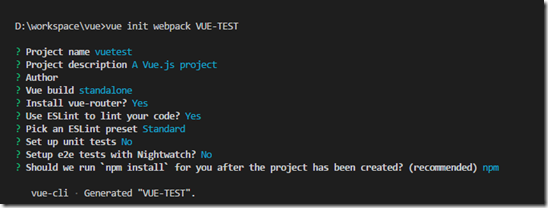
開始學 Vue.js 時,發現這幾年的 Web UI 真的變化很大. 由其是從 node.js 出來之後由其明顯.只好惡補一下 npm, webpack 這些技術好得以入門. 但其細節的設定還是要慢慢的深入.沒辦法一口吃不成胖子啊. 在寫 Vue.js 中其官方文件 ( https://cn.vuejs.org/v2/guide/installation.html ) 真的幫助很大.依官方文件步驟一個基本上的 vue project基本上的配置都幫你搞定了. 最後依其步驟執執行是否建立成功. 接著試修改一下其內容. 開始 App.vue file. 再來查看一下畫面,即可看到大大的 “ Hello World ”,第一個 vue project 完成了….

Java’s Hibernate – Timestamp 造成 performance slow 的問題

Oracle 在使用 Hibernate 時, 其 Condition 中有 Timestamp 時會造成 performance slow 的問題, 從官網上看到這篇在此記錄一下.   Simple Data Types What is going on with DATE and TIMESTAMP ? This section is on simple data types. :-) Prior to 9.2, the Oracle JDBC drivers mapped the DATE SQL type to java.sql.Timestamp . This made a certain amount of sense because the Oracle DATE SQL type contains both date and time information as does java.sql.Timestamp . The more obvious mapping to java.sql.Date was somewhat problematic as java.sql.Date does not include time information. It was also the case that the RDBMS did not support the TIMESTAMP SQL type, so there was no problem with mapping DATE to Timestamp . In 9.2 TIMESTAMP support was added to the RDBMS. The difference between DATE and TIMESTAMP is that TIMESTAMP includes nanoseconds and DATE does not. So, beginning in 9.2, DATE is mapped to Date and TIMESTAMP is mapped to Timestamp . Unfortunately if you were relying on DATE values to contain time in...

Hadoop 的介紹

    最近開始接觸 Hadoop 及 MapReduce 的部份! 好吧~剛好看到不錯的 vedio 在做介紹,把它記錄一下, 以備不時之需. Introduction to Hadoop Destributed System Overview 來源 : http://www.wretch.cc/blog/trendnop09/21756796

WPF – InvokeCommandAction 的使用

    在使用 MVVM 的架構時, 都會使用 Command 來 Handle 所觸發的 Event, 但如果其控制項沒有提供 Command 時, 此時又該如何呢?在 WPF 中提供了 InvokeCommandAction 這個 Class, 它提供控制項在觸發其 Event 時所需的 Handle,讓 develper 人員可以任意的 hanlde 所需的 Event. 下面的例如使用 InvokeCommandAction handle ComboBox 控制項當 select item changed 所觸發 SelectionChanged 的 Event. <ComboBox Width="180" Margin="3" HorizontalAlignment="Left" VerticalAlignment="Top"> <i:Interaction.Triggers> <i:EventTrigger EventName="SelectionChanged"> <i:InvokeCommandAction Command="{Binding StepIdChangedCommand}" /> </i:EventTrigger> </i:Interaction.Triggers> </ComboBox>

C# – 統計 Percentile 函數

    最近一直聽到 P25, P50, P75, P95 這種統計數值, 那在 .NET 中並沒有相對映的函數可以使用, 故在網路上看到了有人提供的此函數的寫法, 故在此記錄一下. public double Percentile(double[] sequence, double excelPercentile) { Array.Sort(sequence); int N = sequence.Length; double n = (N - 1) * excelPercentile + 1; // Another method: double n = (N + 1) * excelPercentile; if (n == 1d) return sequence[0]; else if (n == N) return sequence[N - 1]; else { int k = (int)n; double d = n - k; return sequence[k - 1] + d * (sequence[k] - sequence[k - 1]); } }

WPF – Getting Started with MVVM

I've been working with MVVM and WPF for a couple of weeks now. I decided to log what I've learned here. Here goes a getting started tutorial with MVVM. Download the source code . The Model-View-ViewModel pattern was introduced by John Gossman to effectively utilize the functionality of WPF. Since then, MVVM has been used in a number of WPF applications with very impressive results. MVVM has three components: Model: It is your data or classes that represent entities in your application. It normally contains no WPF-specific code. View: This is the User Interface element visible to the user. Its DataContext is its ViewModel. ViewModel: It contains all the data that needs to be displayed and procedures to modify the model at will. The magic about MVVM is that the ViewModel knows nothing about the View. You see that this is very loosely coupled. The View knows the ViewModel but the ViewModel does not know the View. You can very easily replace the View without affecting t...

WPF - 深入 Style

圖片
Style 用來在類型的不同實例之間共享屬性、資源和事件處理程序,您可以將 Style 看作是將一組屬性值應用到多個元素的捷徑。   這是MSDN上對Style的描述,翻譯的還算中規中矩。Style(樣式),簡單來說,就是一種對屬性值的批處理,類似于Html的CSS,可以快速的設置一系列屬性值到UI元素。   示例   一個最簡單的Style的例子: <Window> <Grid> <Grid.Resources> <Style TargetType="{x:Type Button}" x:Key="ButtonStyle"> <Setter Property="Height" Value="22"/> <Setter Property="Width" Value="60"/> </Style> </Grid.Resources> <Button Content="Button" Style="{StaticResource ButtonStyle}"/> <Button Content="Button" Style="{StaticResource ButtonStyle}" Margin="156,144,286,145" /> </Grid> </Window>   關于Resources的知識,請參見 MSDN ,這里創建了一個目標類型為Button的ButtonStyle,兩個Button使用靜態資源( StaticResource )的查找方式來找到這個Style。Style中定義了Button的高度(Height)和寬度(Width),當使用了這個Style后,兩個Button無需手動設置,即可自動設置...

WPF – 使用 DrawingVisual 描繪圖形

圖片
在 WPF 中有很多種方式來描繪圖形, 其 DrawingVisual 是一個輕量級的 Class, 它需一個 container 來承接, 並不提供 Layout, Hit-Testing 及 Event-Handling. 那來實作一下如何使用 DrawingVisual 來描繪圖形. 建立一個 class, 它繼承 FrameworkElement Class, 並描繪一個 Rectangle . public class MyVisualHost : FrameworkElement { private VisualCollection childern; public MyVisualHost() { childern = new VisualCollection(this); childern.Add(CreateDrawingVisualRectangle()); } protected override int VisualChildrenCount { get { return childern.Count; } } protected override Visual GetVisualChild(int index) { return childern[index]; } private DrawingVisual CreateDrawingVisualRectangle() { DrawingVisual drawing = new DrawingVisual(); using (DrawingContext content = drawing.RenderOpen()) { content.DrawRectangle(Brushes.Red, new Pen(Brushes....

WPF - 性能優化

  WPF性能優化一 - Rendering Tier  根据硬件配置的不同,WPF采用不同的Rendering Tier做渲染。下列情況請特別注意,因為在這些情況下,即使是處于Rendering Tier 2的情況下也不會硬件加速。(不全,其余請查閱SDK)  WPF性能優化二 - 布局和設計  盡量多使用Canvas等簡單的布局元素,少使用Grid或者StackPanel等復雜的,越復雜性能開銷越大。  建立邏輯樹或者視覺樹的時候,遵循Top-Down的原則。  WPF性能優化三 - 圖像  對Image做動畫處理的時候(如調整大小等),可以使用這條語句RenderOptions.SetBitmapScalingMode(MyImage,BitmapScalingMode.LowQuality),以改善性能。 用TileBrush的時候,可以CachingHint。  WPF性能優化四 - 對象行為  訪問CLR對象和CLR屬性的效率會比訪問DependencyObject/DependencyProperty高。注意這里指的是訪問,不要和前面的綁定混淆了。但是,把屬性注冊為DependencyProperty會有很多的優點:比如繼承、數据綁定和Style。 WPF性能優化五 - 應用程序資源  在自定義控件,盡量不要在控件的ResourceDictionary定義資源,而應該放在Window或者Application級。因為放在控件中會使每個實例都保留一份資源的拷貝。 盡量使用Static Resources,但不能盲目使用。  WPF性能優化六 - 文本  文字少的時候用TextBlock或者label,長的時候用FlowDocument.  使用元素TextFlow和TextBlock時,如果不需要TextFlow的某些特性,就應該考慮使用TextBlock,因為它的效率更高。  在TextFlow中使用UIElement(比如TextBlock)所需的代价要比使用TextElement(比如Run)的代价高.在FlowDocument中盡量避免使用Te...

C# - NHibernate Queries Examples (轉貼)

圖片
Today was the first day of my NHibernate course, and I think that it might be good to point out a few of the samples that we worked with. Those are pretty basic NHibernate queries, but they are probably going to be useful for beginners. Let us take my usual Blog model, and see what kind of queries (and results) we can come up with: Let us find a blog by its identifier: var blog = s.Get<Blog>(1); Which results in: We can also try: var blog = s.Load<Blog>(1); Which would result in… absolutely no SQL queries. You can look at a more deep discussion of that here . Now, let us try to search by a property: var blogs = s.CreateCriteria<Blog>() .Add(Restrictions.Eq("Title", "Ayende @ Rahien")) .List<Blog>(); Which results in: If we try to make the same with HQL, it would look: var blogs = s.CreateQuery("from Blog b where b.Title = :title") .SetParameter("title","Ayende @ Rahien") .List<Blog>(); Whic...